Hi,
I’ve seen that this new button field type has been in progress and looking forward on using it. Can the team give a guesstimate when this will be released? like next month, end of 2025, somewhere in 2026…
Thanks.
Hi,
I’ve seen that this new button field type has been in progress and looking forward on using it. Can the team give a guesstimate when this will be released? like next month, end of 2025, somewhere in 2026…
Thanks.
Hi @carloginocatapang , thanks for asking and for sharing your interest in the new button field. Right now we can’t commit to an exact release date, but we’ve logged this feature and are reviewing priorities.
It would help us a lot to understand your specific use case — how would you plan to use the button field in your workflows? Knowing that will let the team better weigh where this sits in the roadmap.
I saw that this is in-progress for a couple of months in the roadmap, is it really in progress?
It would help us a lot to understand your specific use case — how would you plan to use the button field in your workflows?
I want to easily trigger an automation and have the context for a specific row included(like recordId). For example, I can create rows of topics. After clicking the “generate” button it will call a webhook to populate the whole row info. I can have another button called “publish” which will send all the row info to another webhook.
Hi @carloginocatapang, thanks for clarifying your use case — that helps a lot.
The button field is still in our backlog pool, but hasn’t moved forward recently because we’ve been prioritizing AI-related features. Our roadmap will be updated soon to reflect this.
In the meantime, for your scenario (triggering an automation with row context like recordId), one possible workaround is to use a single-select field. You can set up an automation with a Record Match trigger so that when you change the field value (for example, selecting “Generate” or “Publish”), it runs the corresponding webhook and carries the full record info along.
It’s not as smooth as a dedicated button field, but might get you close to what you need until the button field is available.
Hi @Thea thanks for the suggesting a workaround.
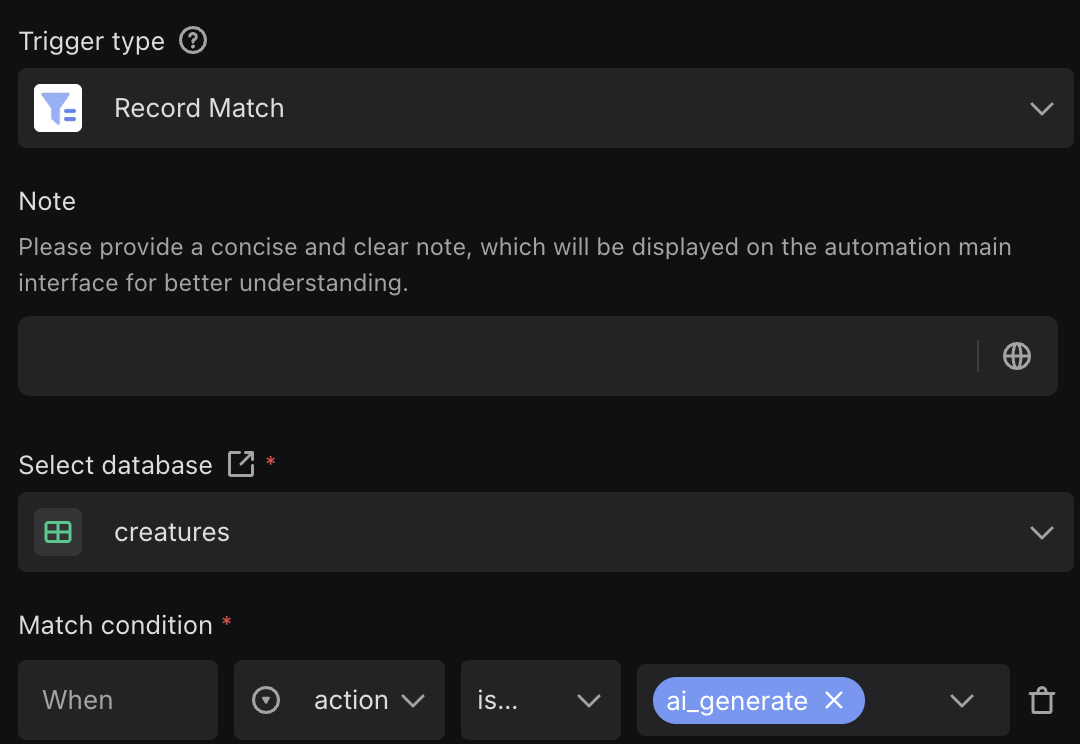
I have setup the automation and tested the connection using manual trigger with hardcoded values. However, it is does not trigger when I change a row value to match the one in automation.
I’m not sure if I’m still missing something. Please advise. Thanks!
Hi @carloginocatapang, thanks for sharing the screenshot. From what you described, it could be a configuration detail in the Record Match trigger that’s stopping it from firing.
To check this properly, could you share a short screen recording or a few more screenshots showing your trigger setup and the field you’re editing? That will help us see exactly where it might be going wrong.
Fixed it.
The automation will not trigger if it changed from an empty value.
Hi @carloginocatapang , thanks for sharing your findings — really appreciate you taking the time to look into it! 
I just ran a quick test on our side, and changing a field from empty to a selected value does seem to trigger the automation normally. Could you share a short recording or a few screenshots of your setup? That’ll help us see if there’s anything else affecting it.