Now I need to send a POST request with binary file contents. If you could describe how can I do that - step by step?
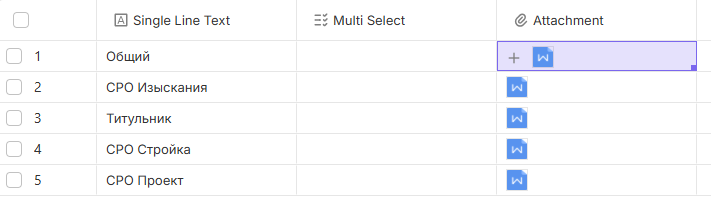
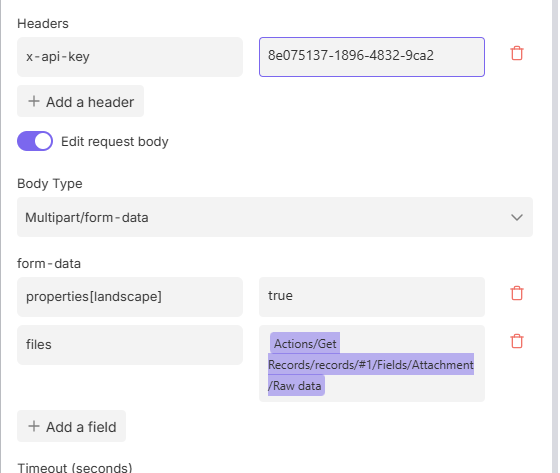
I have this HTTP Request node pre-set, and I just have no idea how to put the binary data there in the “files” parameter. I use Get Records node so that I can refer to the right attachment
Hi there! @anp Based on the Bika API documentation, you cannot send raw file data directly to the “Update Record” endpoint. You need to follow these two steps:
Step 1: Fix your HTTP Request node (Upload to get a Token)
Looking at your screenshot, please make these two specific changes:
Change Key: Change files to file (Bika’s API requires the singular form).
Change Value Mapping:
Remove the current .../Raw data variable.
Re-select the variable, but click the main “Attachment” field object itself.
Crucial: Do NOT select Raw data or Url. Selecting the parent object tells the node to send it as a “File stream” instead of “Text”.
Test it: You should receive a JSON response containing a "token".
Step 2: Update the Record
In your next step (Update Record node), map the token like this in the attachment field: [{"token": "YOUR_TOKEN_FROM_STEP_1"}]
Why this is necessary:
The Bika “Update Record” API (as per the documentation) expects an array of objects with tokens, not the binary file itself. The HTTP node’s job is to first “exchange” the file for a token.
Sorry if my request was unclear, I’m trying to achieve a different workflow. There is an external API which only accepts Multipart/form-data requests. There are few files hosted in Bika as attachments in DB. I need to send the file contents to that external API via Multipart/form-data HTTP request.
Is there any way to do that?
@anp Yes, you can achieve this, but it requires an intermediate step.
Currently, Bika’s automation outputs the file URL, while your external API expects the actual binary data via multipart/form-data. Since Bika URLs are protected for security, external services cannot fetch the file content using the link alone.
The most effective way to handle this right now is using an integration platform like Make.com or Pabbly:
Get the File: Use their “HTTP - Get a File” module to download the file content from the Bika URL.
Upload: Pass that downloaded file object directly to your target API in a Multipart request.
This bridges the gap between Bika’s URL output and the binary requirement of your API. Hope this helps!