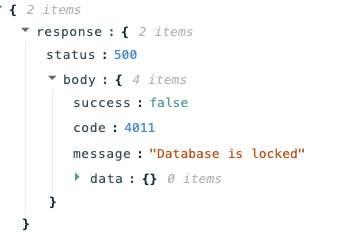
Thanks for sharing the details — I checked with our engineering team.
When running multiple API write operations to the same database, please try to execute them sequentially rather than in parallel, and increase the interval between each job. Rapid concurrent requests (like every 0.5–1 second) can cause conflicts or rate-limit issues.
Adjusting your jobs to run one by one with longer gaps should help keep things stable.
If it still acts up after you tweak the timing, feel free to share more details and we’ll take another look together.
The AI generation for each of the row will take from 2-4 minutes, and there is no way to control when they will call bika API to save the generated data. So there is no point in waiting for some x seconds before I trigger my automation again.
Also, making them sequential will fix the issue but I will wait forever and do things manually which will defeat the purpose of automation.
I think I need a bit more info about how your automation workflow is set up before suggesting tweaks. I also discussed this case again with our team, and here’s what we’re thinking so far:
Are you using Bika’s own automation features, or is this a custom script or another tool that’s doing the AI generation and then hitting the Bika API to write data back?
Is the AI generating all column values for the row first, then updating the whole row at once? Or is it updating each field as soon as it’s ready (meaning several API calls for the same row)?
If you’re using Bika’s built-in automation, could you share a screenshot of how the process is set up?
If your setup saves each field as soon as it’s ready, you might try storing AI results in a local temp file first, then doing a single API call to update the entire row — it helps avoid rapid concurrent writes that can trigger conflicts.
Let me know more about your setup, happy to troubleshoot this together.
So I have records in Bika.ai with some prefilled info like topic title. There are around 40-50 columns which will be generated later by AI. The columns are common types such as short text, long text, number, single select, multi select, and boolean. Also, There is an single select column that will be use to trigger automation.
Automation steps
If the action column matches a certain value the Bika built-in automation will trigger.
In my Bika built-in automation, I only have one action send a very basic http request to Activepieces together with info about the matching row
Activepieces will receive the http request do a lot of stuff including AI generation
At the end of generation, Activepieces will use Bika piece(just an http request) to update the empty columns for the entire row in a single API call.
In summary, there is nothing fancy about my automation. It’s just basic API requests. Hopefully the issue is not because of the number of columns.
Got it, thanks for sharing the details! We managed to reproduce the issue on our side.
Basically, when you use the API to write records with lots of fields (especially if the total character count is high), the request takes much longer. If multiple requests happen at the same time, that’s when you get the “Database is lock” error. Right now, there’s a performance bottleneck with the API write function — we’ve already flagged this with our devs for future optimization.
As a temporary workaround, you could try checking the API response after each request. If you get error code 4011, just retry the request once or twice. It’s not perfect, but it should help until the API gets improved.