In Bika.ai, credits are a type of virtual token that can be used to unlock features or cover the costs of AI inference.
There are two types of credits: Personal Credits and Space Credits.
Personal Credits can be transferred to a space, but space Credits cannot be converted back to Personal Credits.
Personal Credits
Personal Credits are primarily earned by inviting new users to join Bika.ai.
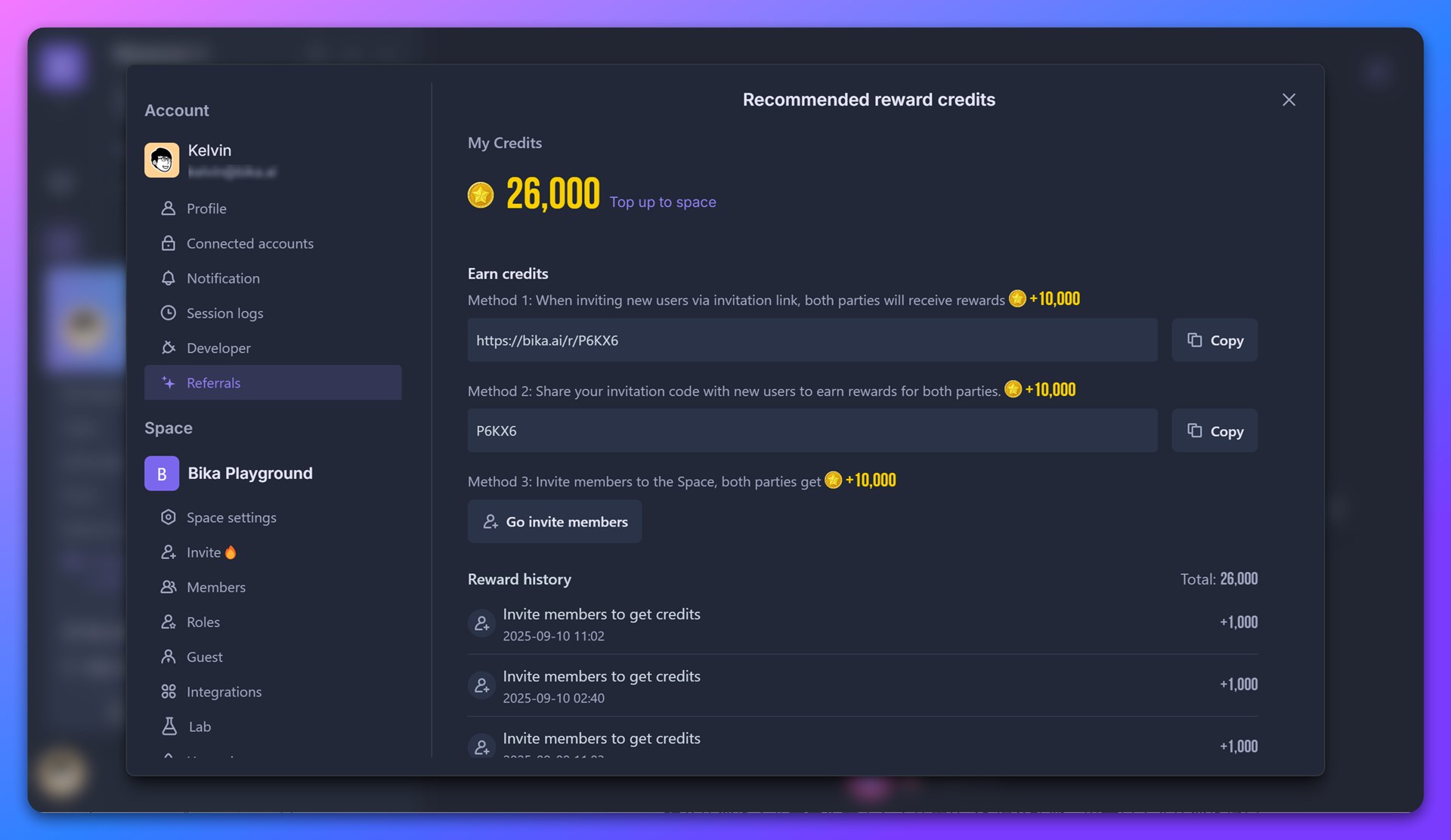
How to Earn
When you sign up for a Bika account, you’ll receive a unique invitation code. You can find it in space (bottom left) → Profile Avatar → My Settings → Referral.
- If your friend enters your invitation code during sign-up, both you and your friend will receive credit rewards.
- You can also invite friends via email or by sharing a referral link. These methods will also earn you credits.
- The exact amount of credits may vary depending on promotions or events.
How to Check Your Balance
Go to My Settings → Referral to see your reward history, including how you earned and used them.
How to Use
Personal Credits cannot be used directly for features or AI inference.
Instead, you’ll need to transfer them to a space first:
- Open My Settings → Referral and click the Top up to space button.
- Note: all of your Personal Credits will be transferred at once. Partial transfers are not supported.
- Personal Credits can only be transferred to spaces with an active subscription. Free spaces cannot receive them.

Space Credits
Space credits represent the shared balance available to all team members within a space.
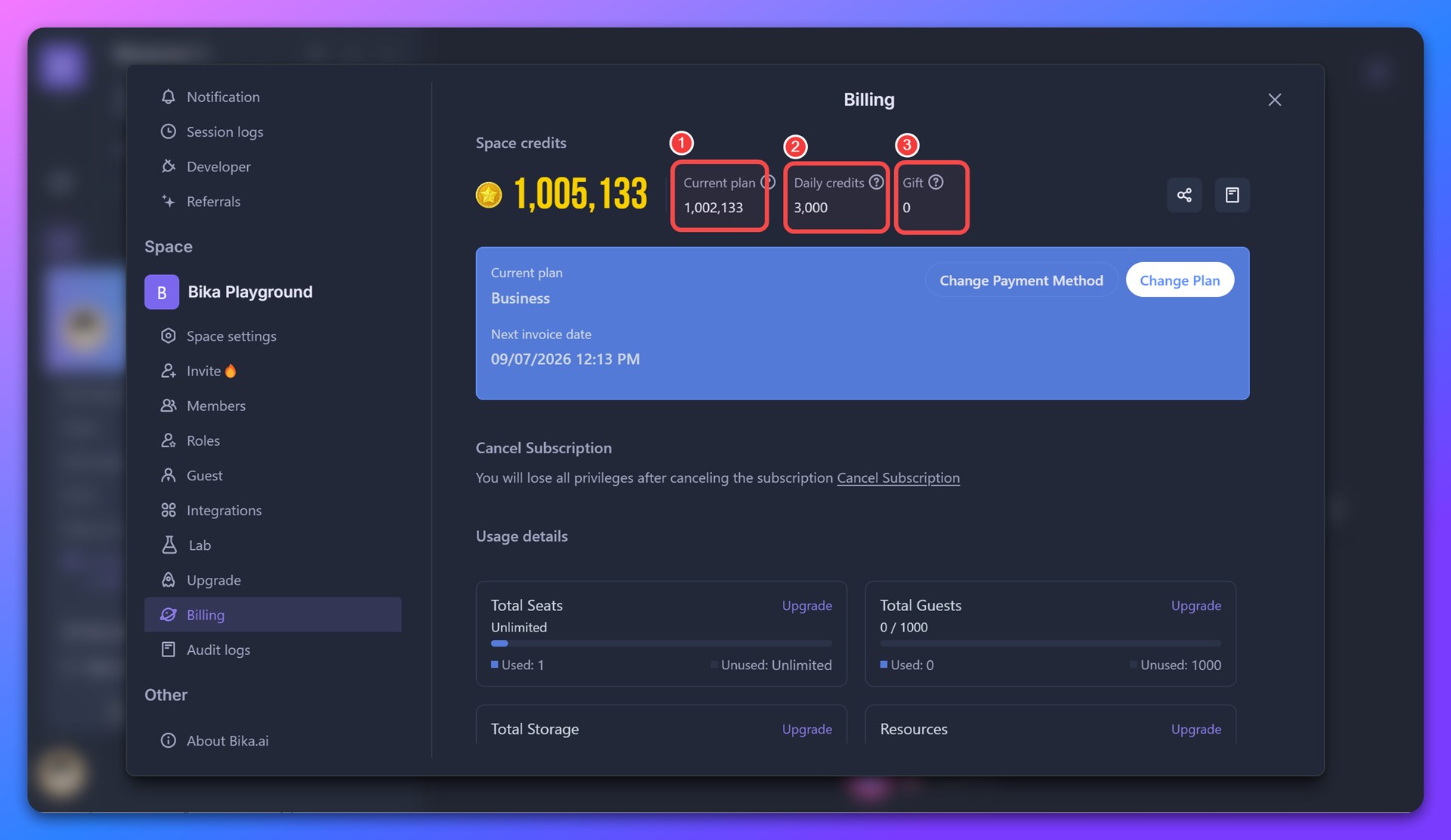
The total Space Credits = Subscription Credits + Daily Credits + Gift Credits, as shown in the diagram below.
-
Subscription Credits
- Each paid subscription plan provides a monthly allowance of credits.
- These credits refresh on your billing date and do not roll over.
- The total amount depends on both your subscription tier and the number of seats:
- Subscription Credits = Credits per seat × Number of seats
- For details, check the Bika Pricing Page.
-
Daily Credits
- Every space receives a small amount of credits each day.
- These reset every 24 hours.
- Available to both free and paid spaces.
-
Gift Credits
- Earned through official promotions, campaigns, or when team members transfer Personal Credits to the space.
- Gift Credits never expire.
How Space Credits Are Used
Currently, space Credits can be used for:
- AI Inference Costs (main usage)
Whenever you chat with an AI agent, generate text, or trigger AI actions in Automations, the related AI model usage costs are automatically deducted from your space Credits.
 Note:
Note:
- Different AI models have different pricing.
- Both input and output token counts affect credit consumption.
- For detailed about AI models, refer to the AI Agent Help Guide.
How to Check Usage
Go to Space → Top-left space Name → Settings → Billing → Usage.
There, you’ll find detailed usage logs, including:
- Amount of credits spent
- Who spent them
- Date of usage
Q&A
1. How many credits does one AI conversation cost?
It depends on the AI model and the length of your conversation. Generally, the more powerful the model, the higher the credit cost.
2. What happens if I run out of credits?
Currently, credits cannot be purchased directly. You can:
- Upgrade your subscription plan to receive more monthly credits, or
- Wait for your subscription credits and daily credits to refresh.
3. Can credits transferred from Personal Credits to Space Credits be refunded?
Once transferred, credits cannot be refunded. Please double-check the target Space name before confirming the transfer.
4. Which type of Space Credits will be consumed first? (Subscription / Daily / Gift)
When you interact with an AI agent, credits will be consumed in this order: Daily Credits → Subscription Credits → Gift Credits.
5. Can credits be transferred between different Spaces?
If you are a member or admin of multiple Spaces, you can transfer your Personal Credits to any one of those Spaces. However, Space Credits cannot be transferred directly between Space A and Space B.