Bika does not display file URLs directly inside the interface. If you need to get the file URL stored in a record, you can retrieve it through the API using the steps below.
1. Open the API Documentation
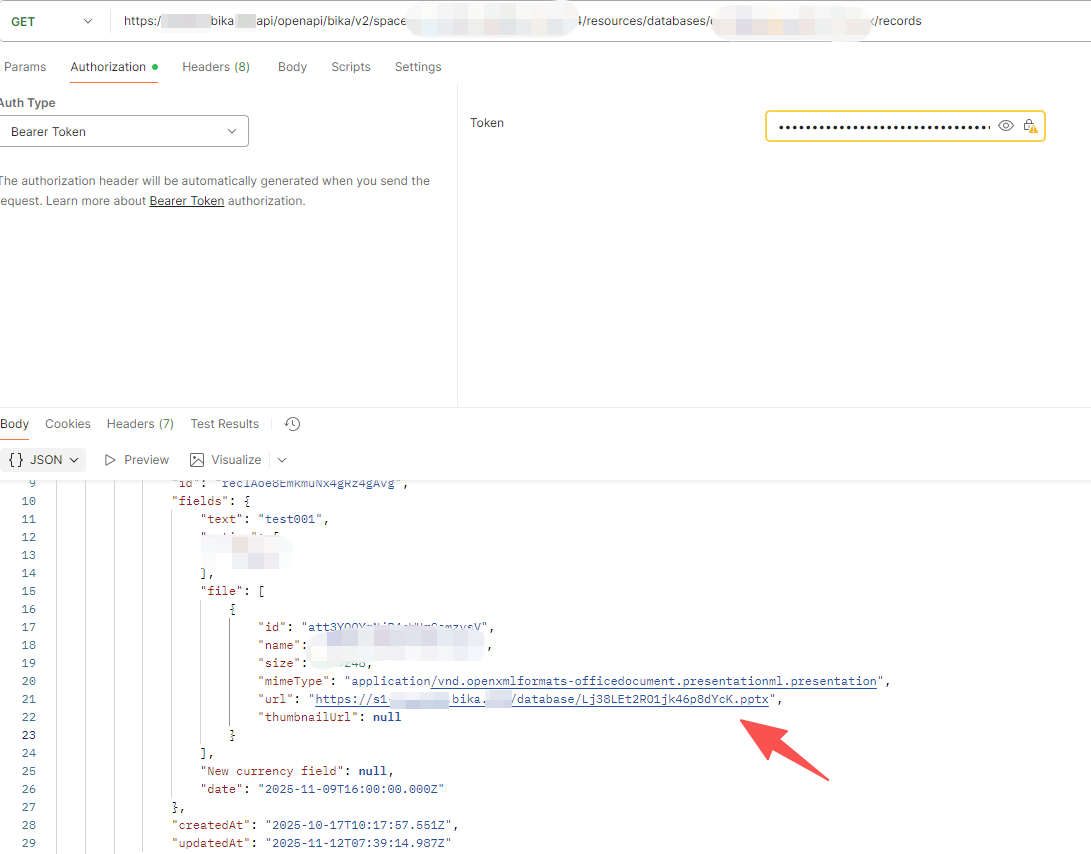
Go to Bika’s API documentation and find the List Records endpoint under the Databases v2 section:
This endpoint returns all fields for each record — including file-type fields.
2. Send a Request Using a Third-Party API Tool
Use any external API client such as Postman, Insomnia, or cURL.
Steps:
- Enter your API key and base URL
- Call the List Records endpoint
- Check the API response — it will include the file field along with the full file URL
Once retrieved, you can use the URL for downloading, processing, or connecting to other systems.
Related Tutorials
- How to use AI and Automation to summarize PDF content How to use AI and Automation to summary the PDF content - #2 by Nagisa
- How to upload files to Bika and update a record via API How to upload files to Bika and update record via API - #10 by bika
- How to retrieve filtered records using API v2 How to Retrieve Filtered Records List Using API v2 - #3